Table of Contents
Introduction:
How to Create a YouTube Video with AI: Artificial Intelligence has revolutionized content creation especially on YouTube. Whether you’re a beginner or a pro, AI tools can now help you write scripts, generate voiceovers, create visuals, and even edit entire videos automatically. In this step-by-step guide, we’ll walk you through how to create a YouTube video using AI from idea to upload.
🧠 Step 1: Choose Your Video Topic
Start by picking a niche or topic your audience will enjoy. AI tools can help you find trending ideas based on search data and engagement.
AI Tools to Try:
- ChatGPT / Gemini: Generate video ideas and scripts.
- TubeBuddy / VidIQ: Analyze trending YouTube topics and SEO keywords.
Tip: Focus on evergreen topics (like tutorials, reviews, or how-tos) for long-term traffic.
✍️ Step 2: Write the Script with AI
Once you have a topic, you can easily create a professional script using AI writing tools.
AI Tools for Scriptwriting:
- ChatGPT / Jasper AI: Generate complete scripts, intros, and outros.
- Copy.ai: Create catchy titles, descriptions, and hooks.
Example Prompt for ChatGPT:
“Write a 2-minute YouTube script on ‘The Future of Artificial Intelligence in 2030’ in an engaging and informative tone.”
You can then refine the script to match your channel’s personality.
🎙️ Step 3: Generate a Voiceover
No need for expensive microphones—AI can give you realistic, human-like voices in multiple accents and tones.
AI Voiceover Tools:
- ElevenLabs – High-quality, natural AI voices.
- Play.ht – Converts text to speech in multiple languages.
- Murf.ai / Speechelo – Ideal for YouTube narration.
Choose a voice that fits your channel’s vibe—energetic, calm, or professional.
🎥 Step 4: Create Video Visuals with AI
Now, bring your script to life with visuals. AI video generators can turn your text or audio into full-fledged videos—complete with stock footage, animations, and transitions.
AI Video Creation Tools:
- Pictory.ai – Turns scripts or blog posts into videos automatically.
- Synthesia.io – Create videos with AI avatars and voiceovers.
- Runway ML / Lumen5 / HeyGen – Great for generating dynamic and professional visuals.
Tip: Keep your videos short, engaging, and visually consistent with your brand.
✂️ Step 5: Edit and Enhance with AI
Even after generation, you can polish your video using AI-powered editing tools. These tools can automatically remove silences, add subtitles, color-correct, and enhance audio.
AI Editing Tools:
- Descript – Edit videos by editing text (perfect for podcasts or talking videos).
- Runway ML – AI video editor for cinematic effects and clean cuts.
- CapCut AI / VEED.io – Easy-to-use for YouTube shorts and quick edits.
Tip: Add background music and captions—AI can help generate these too!
🎨 Step 6: Design Thumbnail and Title with AI
Your thumbnail and title are your first impression—make them count!
AI Thumbnail Tools:
- Canva Magic Studio / Fotor AI / Adobe Firefly: Create custom thumbnails using AI art generation.
- ChatGPT / Jasper: Generate catchy, SEO-optimized video titles.
Example Prompt for ChatGPT:
“Write 5 catchy YouTube titles for a video about AI tools for students.”
📤 Step 7: Upload and Optimize on YouTube
Before uploading, make sure your video is optimized for search.
AI Tools for Optimization:
- VidIQ / TubeBuddy: Keyword suggestions, SEO tags, and thumbnail testing.
- ChatGPT: Generate YouTube descriptions and hashtags.
Optimization Checklist:
✅ Keyword in title and description
✅ Engaging thumbnail
✅ End screens and cards added
✅ Closed captions generated
🚀 Step 8: Promote Your Video with AI
After uploading, use AI to boost reach and engagement.
AI Promotion Tools:
- Buffer / Hootsuite AI: Schedule and automate social media sharing.
- ChatGPT: Create promotional posts for Instagram, LinkedIn, or X.
- Notion AI: Track performance and engagement metrics.
Tip: Post short clips or “AI Shorts” on YouTube and TikTok to increase visibility.
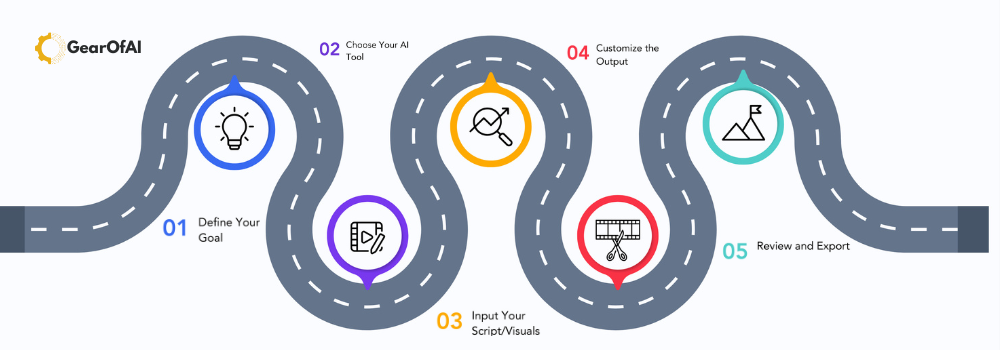
💡 Bonus Tip: AI Workflow Example
Here’s an example of a full AI YouTube workflow you can follow:
- ChatGPT → Generate topic and script.
- ElevenLabs → Create voiceover.
- Pictory → Generate visuals.
- Descript → Edit video.
- Canva → Design thumbnail.
- VidIQ → Optimize title and tags.
- Buffer → Share across platforms.
🧩 Final Thoughts
Creating YouTube videos has never been easier. With the best AI tools, anyone can become a content creator—no expensive gear or editing skills required.
By 2030, AI will make video production fully automated, allowing you to focus on creativity, storytelling, and connecting with your audience.
So, start today—pick your topic, let AI handle the rest, and grow your YouTube channel like never before.