Table of Contents
introduction:
HTML Headings Paragraphs and Formatting Basics: If you’ve just started learning HTML, one of the first things you’ll encounter is how to properly structure and format text on a web page. Every well-designed page from simple blogs to professional websites begins with strong foundations: headings, paragraphs, and formatting tags.
In this guide, we’ll explore these essential HTML elements step-by-step, show you examples of how they work, and teach you how to use them effectively for structure, readability, and SEO.
1. What Are Headings, Paragraphs, and Formatting Tags?
HTML stands for HyperText Markup Language it tells browsers how to display content.
When writing an article or page, you need ways to divide the text into logical sections and style it for better presentation.
That’s where headings, paragraphs, and formatting tags come in.
- Headings organize content into titles and subheadings.
- Paragraphs define blocks of text.
- Formatting tags add visual emphasis like bold, italics, or underline.
These elements don’t just make your page look better they help search engines understand your content hierarchy, improving SEO.
2. HTML Headings Explained
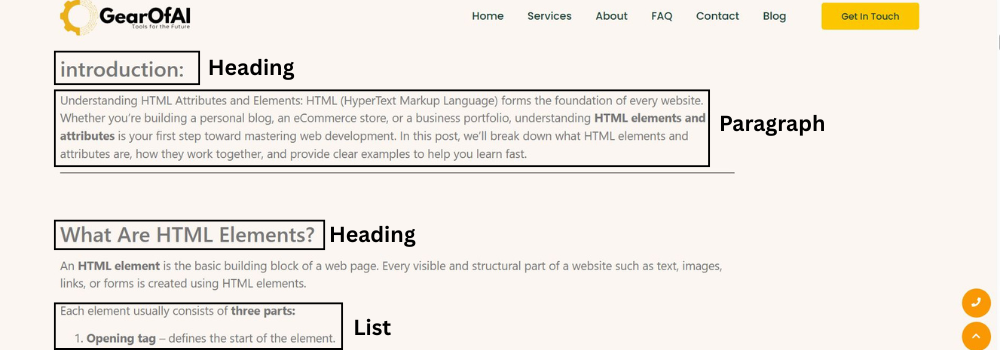
Headings are created using tags from <h1> to <h6>. Each represents a different level of importance.
Example:
<h1>This is a Main Heading</h1>
<h2>This is a Subheading</h2>
<h3>This is a Smaller Subheading</h3>
<h4>This is a Minor Heading</h4>
<h5>This is an Even Smaller Heading</h5>
<h6>This is the Smallest Heading</h6>
Explanation:
<h1>is the most important heading and is typically used once per page (for the page title).<h2>through<h6>are used to create subtopics or nested sections under the main title.
Example in real use:
<h1>Learn HTML Basics</h1>
<h2>Understanding Headings</h2>
<p>Headings help structure your content...</p>
<h2>Working with Paragraphs</h2>
<p>Paragraphs divide text into readable sections...</p>
SEO Tip:
Use only one <h1> per page (your main topic), and arrange the others hierarchically.
For example, <h2> tags divide major sections, and <h3> or <h4> can be used within them.

3. HTML Paragraphs Explained
Paragraphs are the basic text block in HTML, created with the <p> tag.
Example:
<p>This is a simple paragraph in HTML.</p>
Each <p> tag automatically adds spacing above and below the text, making it easier to read.
You can have multiple paragraphs on a page, and browsers will automatically break them into separate text blocks.
Example with multiple paragraphs:
<p>HTML paragraphs are used to separate blocks of text for better readability.</p>
<p>Each paragraph starts on a new line and ends with the closing tag.</p>
Common mistake:
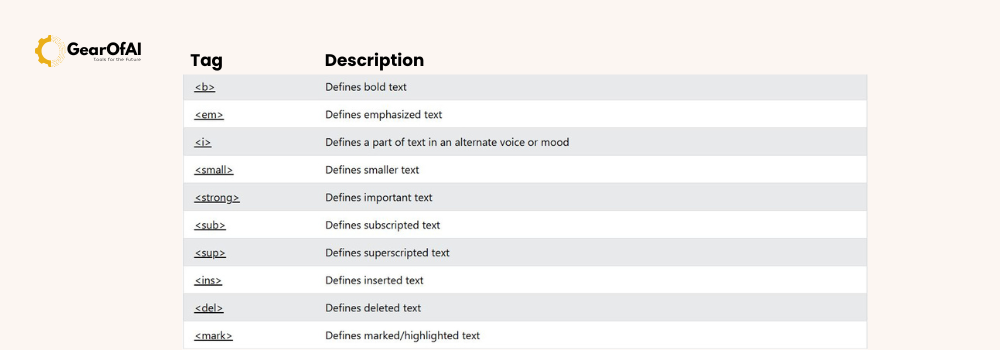
Many beginners use <br> (line break) instead of proper paragraphs. Use <br> only when you need a single line break within a paragraph not for separating ideas.
Example:
<p>This is one paragraph.<br>This line is inside the same paragraph.</p>
4. Basic Formatting Tags in HTML
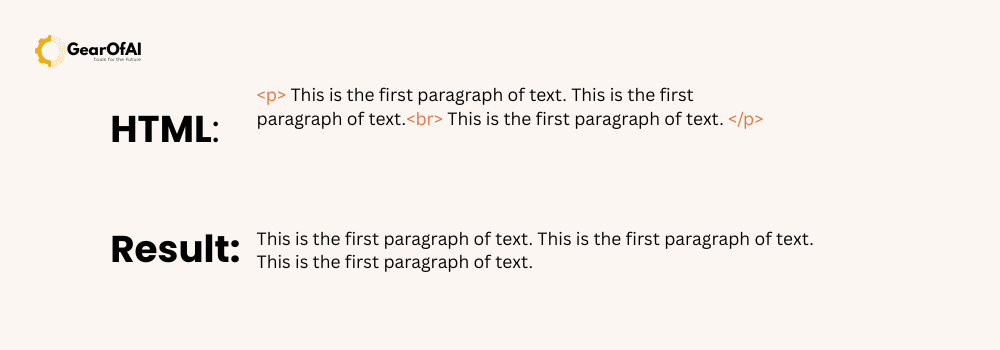
Formatting tags help you style text to emphasize certain parts.
Common Formatting Tags:
| Tag | Description | Example |
|---|---|---|
<b> | Bold text (visual emphasis) | <b>Bold text</b> |
<strong> | Important text (semantic emphasis) | <strong>Important!</strong> |
<i> | Italic text | <i>Italic text</i> |
<em> | Emphasized text (semantic italic) | <em>Highlighted idea</em> |
<u> | Underline text | <u>Underlined</u> |
<small> | Smaller text | <small>Small note</small> |
<mark> | Highlighted text | <mark>Highlighted</mark> |
<del> | Deleted text | <del>Removed content</del> |
<ins> | Inserted text | <ins>Added content</ins> |
<sub> | Subscript text | H<sub>2</sub>O |
<sup> | Superscript text | x<sup>2</sup> |
Example in action:
<p>Learning <strong>HTML</strong> is <em>essential</em> for all web developers.</p>
<p>You can also <u>underline</u> or <mark>highlight</mark> text to make it stand out.</p>
5. Nesting Tags Properly
HTML allows you to nest tags, meaning you can place one tag inside another — but the order matters.
Correct nesting:
<p>This is <strong>very <em>important</em></strong> information.</p>
Incorrect nesting (don’t do this):
<p>This is <strong>very <em>important</strong></em> information.</p>
Browsers can fix minor mistakes, but incorrect nesting may cause formatting issues or SEO problems.
6. Combining Headings, Paragraphs, and Formatting
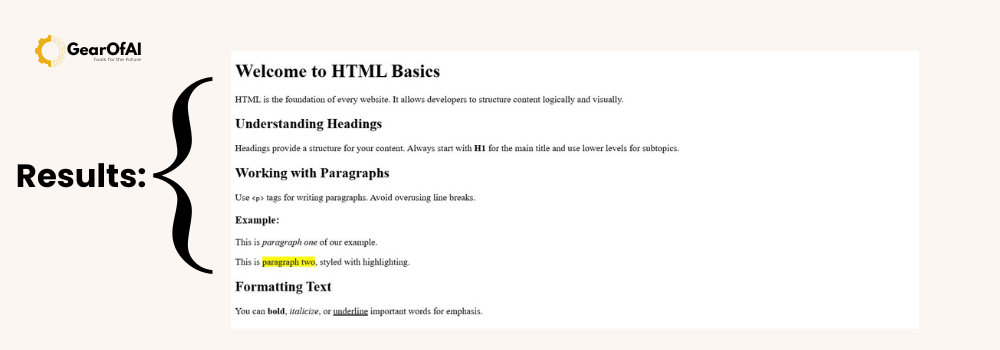
Here’s how all these elements come together in a real-world example:
<!DOCTYPE html>
<html lang="en">
<head>
<meta charset="UTF-8">
<meta name="viewport" content="width=device-width, initial-scale=1.0">
<title>HTML Headings, Paragraphs, and Formatting</title>
</head>
<body>
<h1>Welcome to HTML Basics</h1>
<p>HTML is the foundation of every website. It allows developers to structure content logically and visually.</p>
<h2>Understanding Headings</h2>
<p>Headings provide a structure for your content. Always start with <strong>H1</strong> for the main title and use lower levels for subtopics.</p>
<h2>Working with Paragraphs</h2>
<p>Use <code><p></code> tags for writing paragraphs. Avoid overusing line breaks.</p>
<h3>Example:</h3>
<p>This is <em>paragraph one</em> of our example.</p>
<p>This is <mark>paragraph two</mark>, styled with highlighting.</p>
<h2>Formatting Text</h2>
<p>You can <strong>bold</strong>, <em>italicize</em>, or <u>underline</u> important words for emphasis.</p>
</body>
</html>
7. Why Formatting Matters for SEO
Search engines analyze HTML structure to understand page hierarchy and relevance.
Here’s how headings and formatting help SEO:
<h1>tells search engines what your page is about (use your main keyword here).<h2>and<h3>divide the topic logically improving readability.<strong>and<em>add context to key phrases.- Proper paragraphs improve user experience and reduce bounce rate.
Example SEO structure for this blog:
<h1>HTML Headings, Paragraphs, and Formatting Basics</h1>
<h2>What Are Headings?</h2>
<h2>Working with Paragraphs</h2>
<h2>Formatting Text for Readability</h2>
8. Common Mistakes Beginners Make
- Using
<br>instead of<p>for paragraphs. - Using multiple
<h1>tags. - Forgetting to close tags.
- Nesting tags incorrectly.
- Mixing content and structure (e.g., styling text manually instead of using CSS).
9. Best Practices Summary
✅ Use one <h1> per page.
✅ Keep heading hierarchy logical (<h2> → <h3> → <h4>).
✅ Wrap each idea in a paragraph.
✅ Use formatting tags sparingly for emphasis, not decoration.
✅ Validate your HTML with W3C Validator before publishing.
10. Final Thoughts
Learning HTML Headings, Paragraphs, and Formatting is your first big step toward becoming a web developer.
Once you understand how these elements work, you can move on to HTML lists, links, and media embedding, which take your pages from plain text to interactive layouts.
At GearOfAI.com, we’re building a full tutorial series for beginners from HTML basics to advanced website creation with WordPress. Stay tuned and explore our Tutorials Section for more lessons.
If you have any questions or want to share your HTML practice, email us at info@gearofai.com we’d love to help you learn faster.